Play Training
Set a Non Local Client
Number of Guide Steps: 4
The Non-Local Client setting plays a crucial role in guiding the recommendation engine to discern suitable products for endorsement or, conversely, products that should not be suggested.
As an illustration, our O&O solutions are inappropriate for recommendation to a client without any presence in a Lee market. This setting ensures precision in tailoring recommendations to align with the specific geographical context and business footprint of each client.
Understanding how to configure settings for non-local clients is essential to enhance the accuracy of the recommendation engine. Follow these steps to properly set up a non-local client

- 1. Accessing Client Information:
- 2. Editing Client Details
- 3. Selecting Client Type
- 4. Saving Changes:
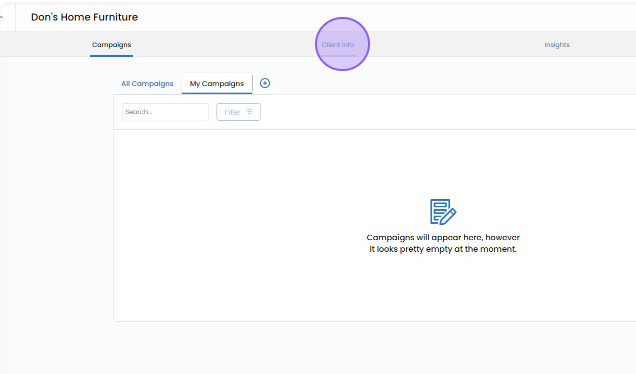
Accessing Client Information:.
Navigate to the client information tab located at the top of the client page. This is the starting point for making adjustments tailored to non-local clients.
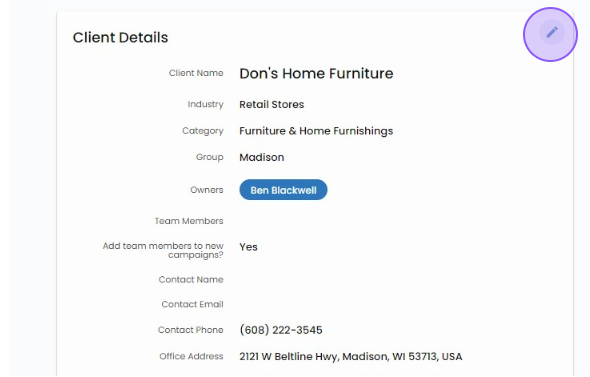
Editing Client Details.
Within the client details box, locate and click on the pencil icon. This action opens the client details for editing.
Selecting Client Type.
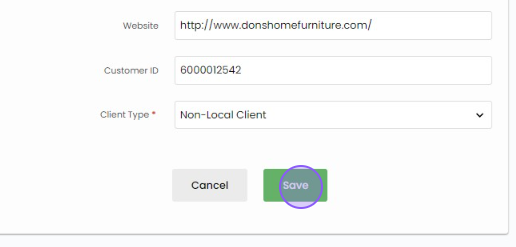
In the client type drop-down menu, opt for 'non-local client.' This categorization is crucial for signaling to the system that the client resides outside the local market.

Saving Changes:.
After choosing the non-local client type, click the 'Save' button to confirm your selection. This step is pivotal as it ensures that the recommendation engine factors in the distinctive aspect of the client being situated beyond a local market
By following these straightforward steps, you effectively configure the system to recognize the unique characteristics of a non-local client. This information is then utilized by the recommendation engine to tailor its suggestions, taking into consideration the geographical context and ensuring that the client's location outside a local market is appropriately accounted for in the decision-making process..